
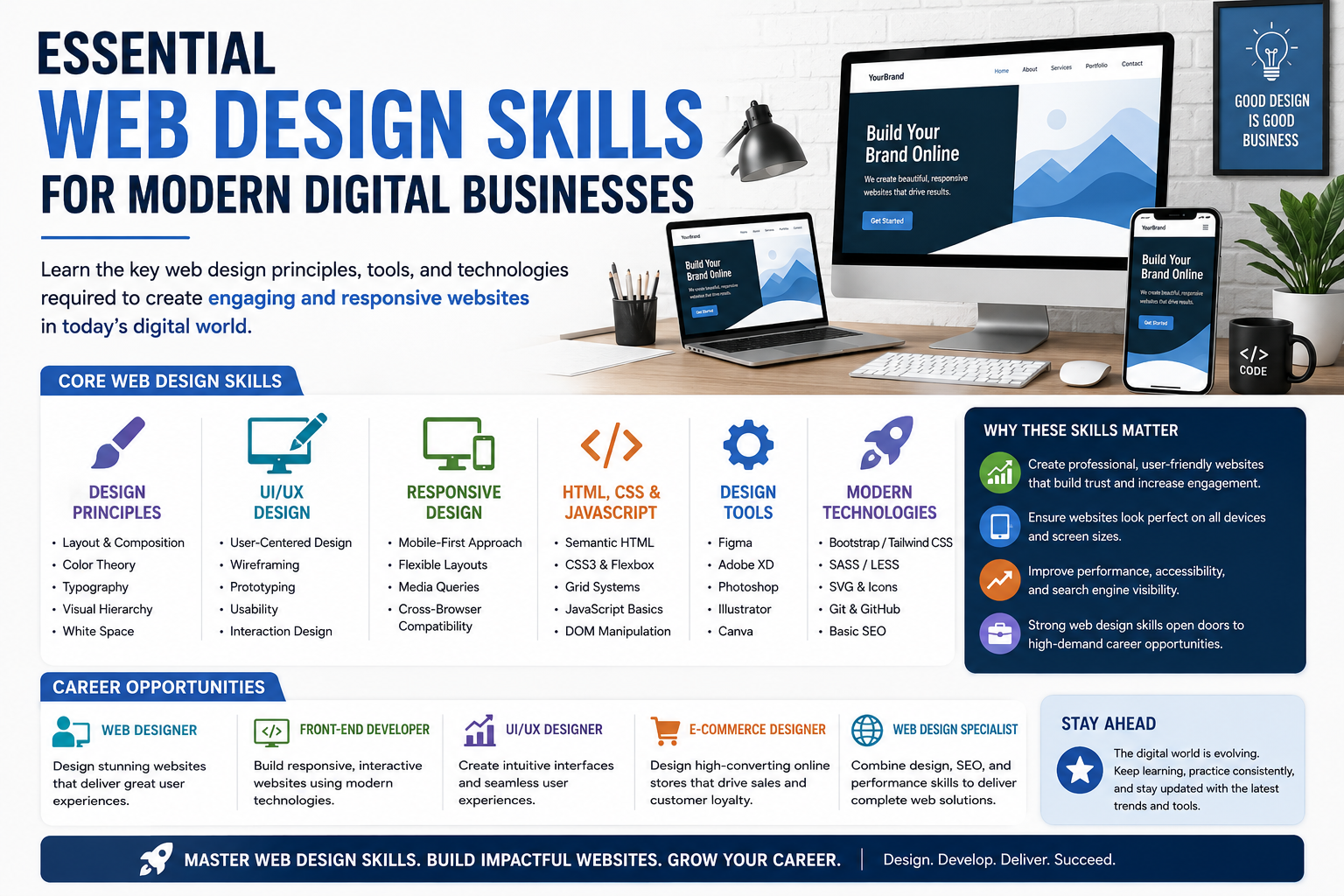
The Key Web Design Principles, Tools, and Technologies Needed to Build Successful Digital Experiences
In today’s digital-first world, a business’s website is often the first interaction customers have with a brand. Whether it’s a startup, e-commerce store, educational institution, healthcare provider, or multinational corporation, a professional and user-friendly website has become essential for growth and credibility.
Modern users expect websites to be:
- Fast
- Responsive
- Easy to Navigate
- Visually Appealing
- Mobile Friendly
- Secure
As a result, web design has evolved beyond aesthetics. Today’s web designers must understand user experience, responsive layouts, accessibility, performance optimization, and modern development technologies.
For students and aspiring professionals, learning web design opens opportunities in freelance work, startups, agencies, product companies, and digital businesses across industries.
What is Web Design?
Web design is the process of planning, creating, and optimizing websites to provide users with an effective and engaging online experience.
It involves:
- Visual Design
- User Experience (UX)
- User Interface (UI)
- Layout Creation
- Navigation Design
- Responsive Design
A successful website combines aesthetics with functionality.
Why Web Design Matters for Businesses
A website often determines a visitor’s first impression of a business.
Good web design helps businesses:
- Build Trust
- Improve User Engagement
- Increase Conversions
- Strengthen Brand Identity
- Improve Customer Experience
Poor design can cause visitors to leave within seconds.
Skill #1: Understanding User Experience (UX)
User Experience focuses on how users interact with a website.
Good UX design ensures:
- Easy Navigation
- Clear Information Structure
- Fast Access to Content
- Smooth User Journeys
Web designers should always prioritize user needs.
Why UX Matters
Users stay longer on websites that are intuitive and easy to use.
Better UX often leads to:
- Higher Engagement
- Increased Sales
- Improved Customer Satisfaction
Skill #2: User Interface (UI) Design
UI Design focuses on the visual elements users interact with.
Examples include:
- Buttons
- Forms
- Menus
- Icons
- Navigation Bars
A clean interface improves usability and professionalism.
Skill #3: Responsive Web Design
Modern users access websites through:
- Smartphones
- Tablets
- Laptops
- Desktop Computers
Responsive design ensures websites work properly on all screen sizes.
Benefits
- Better User Experience
- Improved Mobile Performance
- Higher Search Engine Rankings
Mobile-first design has become an industry standard.
Skill #4: HTML Fundamentals
HTML forms the structure of every website.
Students should understand:
- Headings
- Paragraphs
- Images
- Links
- Forms
- Semantic Elements
HTML is the foundation of web development.
Skill #5: CSS Styling
CSS controls how websites look.
It helps designers create:
- Layouts
- Colors
- Typography
- Animations
- Responsive Designs
Strong CSS skills allow designers to create visually attractive interfaces.
Skill #6: JavaScript Basics
JavaScript adds interactivity to websites.
Examples include:
- Dynamic Content
- Form Validation
- Interactive Menus
- Sliders
- Popups
Understanding JavaScript improves website functionality.
Skill #7: Visual Design Principles
Professional web designers understand:
Color Theory
Creating appealing color combinations.
Typography
Selecting readable fonts.
Visual Hierarchy
Guiding user attention effectively.
Consistency
Maintaining a unified design language.
These principles improve overall user experience.
Skill #8: Wireframing and Prototyping
Before development begins, designers often create:
- Wireframes
- Mockups
- Interactive Prototypes
These help visualize layouts and user flows.
Popular tools include:
- Figma
- Adobe XD
- Sketch
Planning reduces development errors.
Skill #9: Figma and Modern Design Tools
Figma has become one of the most popular design platforms.
Designers use it for:
- UI Design
- Collaboration
- Prototyping
- Design Systems
Learning Figma significantly improves employability in design and development roles.
Skill #10: Accessibility Design
Websites should be usable by everyone, including individuals with disabilities.
Accessibility involves:
- Proper Contrast
- Keyboard Navigation
- Screen Reader Compatibility
- Clear Labels
Inclusive design improves user experience for all visitors.
Skill #11: Website Performance Optimization
Users expect websites to load quickly.
Web designers should understand:
- Image Optimization
- Efficient Layouts
- Performance Best Practices
Fast websites improve user retention and search engine rankings.
Skill #12: Basic SEO Knowledge
Web design and SEO work together.
Designers should understand:
- Page Structure
- Heading Hierarchy
- Mobile Friendliness
- Site Speed
These elements influence search engine visibility.
Skill #13: Content Layout and Information Architecture
Good websites organize information effectively.
Designers should understand:
- Navigation Structures
- User Flows
- Content Placement
- Page Hierarchies
Proper organization improves usability.
Skill #14: Collaboration with Developers
Web designers often work closely with:
- Frontend Developers
- Backend Developers
- Content Teams
- Marketing Teams
Understanding development workflows improves collaboration.
Skill #15: Understanding Modern Web Trends
Digital experiences continue evolving.
Current trends include:
- Dark Mode Interfaces
- Minimalist Design
- Micro-Interactions
- AI-Powered Experiences
- Personalized Content
Staying updated helps designers remain competitive.
Essential Tools for Web Designers
Modern web designers commonly use:
Design Tools
- Figma
- Adobe XD
Development Tools
- VS Code
- Chrome DevTools
Collaboration Tools
- GitHub
- Trello
Content Platforms
- WordPress
These tools support professional workflows.
Career Opportunities in Web Design
Learning web design can lead to roles such as:
Web Designer
Design website interfaces.
UI Designer
Create user interfaces.
UX Designer
Improve user experiences.
Frontend Developer
Build responsive interfaces.
Product Designer
Design digital products.
Freelance Designer
Work independently with clients.
Demand continues to grow as businesses expand online.
Why Businesses Need Skilled Web Designers
Modern organizations compete online.
Professional web design helps businesses:
- Attract Customers
- Improve Engagement
- Build Trust
- Increase Revenue
As a result, skilled web designers remain valuable across industries.
Common Mistakes Beginners Make
Focusing Only on Visual Design
Functionality is equally important.
Ignoring Mobile Users
Most traffic now comes from mobile devices.
Overcomplicating Layouts
Simple designs often perform better.
Neglecting Accessibility
Inclusive design benefits everyone.
Ignoring Performance
Slow websites lose visitors.
Avoiding these mistakes improves project quality.
How Students Can Start Learning Web Design
Step 1
Learn HTML and CSS.
Step 2
Understand Responsive Design.
Step 3
Explore Figma.
Step 4
Learn Basic JavaScript.
Step 5
Build Portfolio Projects.
Step 6
Study UX and UI Principles.
Consistent practice leads to improvement.
Future of Web Design
The future of web design will increasingly focus on:
- User-Centered Design
- Mobile Experiences
- Accessibility
- AI Integration
- Interactive Interfaces
Designers who combine creativity with technical understanding will remain highly valuable.
Frequently Asked Questions
Is web design a good career in 2026?
Yes. Businesses continue investing heavily in digital experiences.
Do web designers need coding skills?
Basic HTML, CSS, and JavaScript knowledge is highly beneficial.
Is Figma important?
Yes. Figma is one of the most widely used design tools today.
Can beginners learn web design?
Absolutely. Starting with HTML, CSS, and design fundamentals is a great approach.
Conclusion
Web design is much more than creating attractive layouts. It combines creativity, user experience, technology, accessibility, and business objectives to create effective digital experiences. Understanding responsive design, HTML, CSS, JavaScript, UX principles, and modern design tools helps professionals build websites that engage users and support business growth.
As digital transformation continues across industries, skilled web designers will remain in high demand. Students who develop both design thinking and technical knowledge position themselves for exciting opportunities in web design, frontend development, UX/UI design, and digital product creation.
CadMate India helps students develop practical web design skills through hands-on projects, modern design tools, and industry-focused training that prepares them for real-world digital careers.